★ PLATFORM GUIDE · 2026
📱 AI girlfriend apps: iPhone vs Android in 2026.
Your phone determines what AI girlfriend apps you can use — and how good the experience is. Apple's App Store bans most NSFW content, Android allows sideloading, and web apps bridge the gap. Here's exactly what works where, app by app.
The short version: Android is better for AI girlfriend apps, period. You can sideload full NSFW versions, get push notifications, and access every app. iPhone users aren't locked out — web apps work well in Safari — but you lose native notifications, and Apple can pull apps at any time. GoLove has the best cross-platform experience.
1. 🍎 The App Store problem
Apple's App Store guidelines are clear: no explicit sexual content. Guideline 1.1.4 specifically bans "explicit descriptions or displays of sexual organs or activities intended to stimulate erotic rather than aesthetic or emotional feelings." Translation: NSFW AI girlfriends are not welcome.
What this means in practice:
- Most AI girlfriend apps don't have an iOS app at all — they never bothered submitting because they know it'd be rejected.
- Apps that do have an iOS version (like Replika) have NSFW features removed or heavily censored on that version.
- Some apps tried to sneak NSFW content past review and got removed after the fact — Replika had its NSFW features pulled after Apple pressure in early 2023.
- Even SFW-adjacent AI companion apps face increased scrutiny. Apple has tightened enforcement since 2024.
Apple's track record: Replika's NSFW removal is the highest-profile case, but it's not the only one. Several smaller AI companion apps have been quietly removed from the App Store. Apple doesn't always announce removals — the app just disappears one day.
The EU DMA exception: In 2024, the EU's Digital Markets Act forced Apple to allow alternative app stores in Europe. This theoretically opens a path for NSFW apps via third-party stores like AltStore PAL. In practice, very few AI girlfriend apps have taken advantage of this yet. It may matter in 2027; in 2026, it's mostly theoretical.
Reality check: if you're on iPhone and want full NSFW AI girlfriend features, the App Store is not your friend. Web apps are your best option — and they're genuinely good in 2026.
2. 🤖 The Android advantage
Android doesn't have Apple's content restrictions — and more importantly, it supports sideloading: installing apps directly from APK files, bypassing the Play Store entirely.
Why this matters for AI girlfriend apps:
- Full NSFW features. Sideloaded APKs don't go through Google's review process. Developers include every feature — no censorship, no filter watering-down.
- Direct APK downloads. Many AI girlfriend apps offer APK downloads on their websites. GoLove, Candy AI, and Crushon AI all provide direct APKs with full functionality.
- No surprise removals. A sideloaded app can't be pulled from your phone by Google. Once it's installed, it's yours.
- Full notification support. Sideloaded apps have the same notification capabilities as Play Store apps.
Google Play Store vs Apple App Store: the Play Store is somewhat more lenient than Apple, but still restricts explicit content. Some AI girlfriend apps exist on the Play Store with limited NSFW — but the sideloaded version always has more. Don't settle for the Play Store version if the developer offers a direct APK.
How to sideload safely:
- Go to the official website of the app (not a random APK mirror site)
- Download the APK directly from their download page
- On your Android phone: Settings → Security → enable "Install from unknown sources" (or "Install unknown apps" on newer Android)
- Open the downloaded APK and install
- Re-disable "Install from unknown sources" after installation
Safety warning: only download APKs from the app's official website. Third-party APK sites (APKPure, APKMirror, random blogs) can distribute modified versions with malware. If the URL isn't the app's own domain, don't download it.
3. 🌐 Web apps vs native: the great equalizer
Here's the good news for iPhone users: almost every AI girlfriend app works in a mobile browser. And in 2026, mobile web apps are genuinely good — often indistinguishable from native apps.
What is a PWA? A Progressive Web App is a website that behaves like an app. You add it to your home screen, it launches without browser chrome (no URL bar, no tabs), and it feels native. Most AI girlfriend apps support this.
PWA on iOS (Safari):
- Open the app's website in Safari
- Tap the Share button → "Add to Home Screen"
- The app now launches from your home screen like a regular app
- No App Store involved. Apple can't remove it from your phone
- Limitations: no push notifications on older iOS (added in iOS 16.4, but many apps haven't implemented it yet), no background refresh, and Safari's storage limits can clear cached data
PWA on Android (Chrome):
- Chrome prompts "Add to Home Screen" automatically on supported sites
- Full push notification support
- Background sync works
- Storage limits are more generous than iOS
- Nearly indistinguishable from a native app
Web app vs native app — performance: web apps are 10–15% slower on average for complex interactions (image loading, voice generation). For text chat, the difference is imperceptible. For image generation, you might notice an extra second or two of loading. Not a dealbreaker for most people.
Which browser is best? On iOS, you must use Safari for home screen PWA (Apple's rule). On Android, Chrome gives the best PWA experience, but Firefox and Brave also work. Edge cases: some apps use features that work best in Chrome specifically.
4. 📊 App-by-app platform breakdown
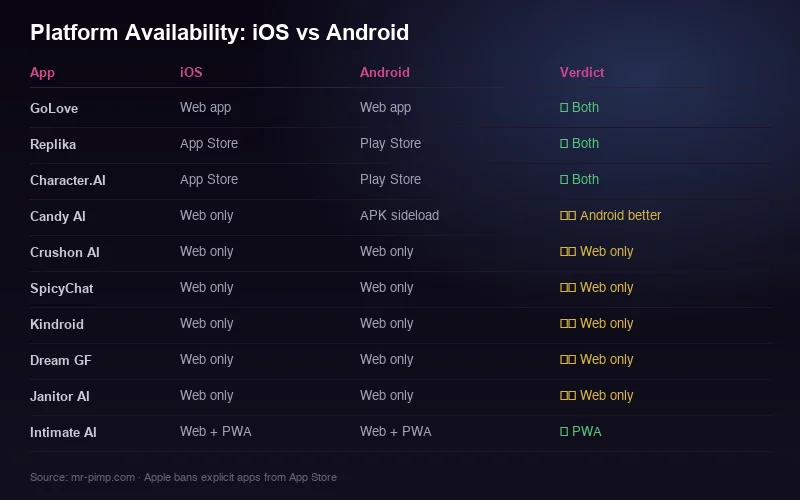
Here's the complete status for all 17 apps we review — what's available on each platform, and whether NSFW works.
Full NSFW on all platforms:
- GoLove — Web app (iOS/Android), Android APK, no iOS native. NSFW works everywhere. Best mobile experience overall. Try free →
- Candy AI — Web app (iOS/Android), Android APK. No iOS native. Full NSFW on web and APK.
- Kindroid — Web app only. No native apps on either platform. Works well in Safari and Chrome as PWA.
- SpicyChat — Web app only. Mobile-responsive. No native apps.
- Crushon AI — Web app (iOS/Android), Android APK. No iOS native. NSFW on all.
- Pephop AI — Web app only. Mobile-responsive. No native apps.
- Janitor AI — Web app only. Requires API key setup. Works on mobile but clunky.
Platform-limited NSFW:
- Replika — iOS native + Android native + web. But NSFW is removed on all platforms. Great app, wrong purpose.
- Character AI — iOS native + Android native + web. No NSFW at all, heavy content filter.
- Intimate AI — Android APK + web. iOS web works but inconsistent NSFW enforcement.
- Dream GF — Web app (iOS/Android), Android APK. Full NSFW on web; image limits on iOS Safari (some image types don't render).
Web-only (no native apps, no APKs):
- SoulGen, PromptChan, Kupid AI, Muah AI, Anima, Eva AI — all web-only, all work on mobile browsers, all support NSFW via web interface.
For detailed individual reviews, see our full review directory.
5. 🔧 Best iOS workarounds
If you're on iPhone and not switching to Android, here's how to get the best AI girlfriend experience.
1. Safari PWA (the main strategy). Add the web app to your home screen. This is the primary workaround and it works well. GoLove, Candy AI, and Kindroid all function smoothly as Safari PWAs.
2. Use Safari, not Chrome on iOS. All browsers on iOS use Apple's WebKit engine anyway (yes, even Chrome). But only Safari supports "Add to Home Screen" as a proper PWA. Chrome on iOS gives you a bookmark, not a PWA.
3. Enable "Allow Cross-Website Tracking" for the specific app. Settings → Safari → toggle off "Prevent Cross-Site Tracking" if the app requires it for login sessions. Some apps lose your session between visits without this. You can re-enable it for general browsing.
4. Desktop mode for stubborn layouts. Some web apps render poorly in mobile Safari. In Safari, tap the "aA" icon in the URL bar → "Request Desktop Website." This sometimes gives a better layout, especially for apps not optimized for mobile.
5. Clear website data if things break. Settings → Safari → Advanced → Website Data → find the app's domain → swipe to delete. This fixes most login loops and loading issues.
6. VPN considerations. If an app's web version is geo-blocked in your country, a VPN bypasses it on any platform. But on iOS specifically: some VPN apps interfere with PWA functionality. Mullvad and Proton VPN both work fine with Safari PWAs. Avoid free VPNs.
Bottom line: Safari PWAs work well for text chat and basic features. Where iOS falls short is push notifications, image download behavior (some images require manual save steps), and occasional session drops. None of these are dealbreakers — just annoyances.
6. 🔔 Notification support by platform
Notifications matter if you want "proactive" messages from your AI — the ones that feel like she's thinking about you and reaching out. Here's the reality:
Android (native/APK):
- Full push notification support on all native apps and sideloaded APKs
- GoLove, Candy AI, Crushon AI — all send proactive messages as notifications
- You can customize notification frequency, quiet hours, and content preview
- Notifications appear on lock screen (hide content preview in app settings for privacy)
Android (web PWA):
- Web push notifications work well in Chrome PWAs
- Slightly less reliable than native — may not wake the device from deep sleep
- GoLove and Kindroid support web push. Most others don't.
iOS (native apps):
- Only Replika and Character AI have native iOS apps — both are SFW only
- Full notification support on those apps, but irrelevant for NSFW use
iOS (Safari PWA):
- Apple added web push to Safari PWAs in iOS 16.4 (2023)
- In practice, very few AI girlfriend apps have implemented it
- GoLove is the only NSFW app with working Safari PWA notifications as of Sep 2026
- Most others: you only see new messages when you open the app. No proactive alerts.
Privacy tip: regardless of platform, turn off notification previews for AI girlfriend apps. You don't want "I've been thinking about last night..." appearing on your lock screen in a meeting.
7. ⚡ Performance comparison
Does your phone matter for AI girlfriend app performance? More than you'd think.
Battery drain:
- Text chat — minimal. 1–2% battery per 30 minutes on any phone. Not a concern.
- Image generation — moderate. The processing happens server-side, but rendering large images and the polling loop drain battery. ~5% per 30 minutes of heavy image generation.
- Voice messages — noticeable. Audio playback + generation requests + network activity. ~8% per 30 minutes of voice-heavy sessions. Older phones drain faster.
- Worst offenders: Dream GF and PromptChan drain noticeably more battery than others — likely unoptimized web code.
RAM usage:
- Web apps in Safari/Chrome use 150–400MB RAM depending on the app
- Native Android apps (Replika): ~200MB. Sideloaded APKs: similar
- On phones with 4GB RAM or less, heavy apps (Dream GF, Candy AI during image gen) can cause tab/app reloads
- 6GB+ RAM: no issues with any app
Network speed matters more than phone speed. AI girlfriend apps are server-dependent. A fast phone on a slow connection gives worse results than a slow phone on Wi-Fi. Response latency is 90% server-side, 10% device. If you're on cellular data, expect slightly slower responses and image generation.
Older phones: anything from 2021 or newer runs all AI girlfriend apps fine. Older phones (2019–2020) may struggle with image-heavy apps and voice features. Text chat works on anything with a modern browser.
8. 🏆 Mr.Pimp's recommendation per platform
After testing every app on both iPhone and Android, here's my pick for each platform:
Best for Android:
- #1 GoLove APK — full features, great notifications, fast, stable. The clear winner. Download free →
- #2 Candy AI APK — best for image generation specifically. Sideload for full features.
- #3 Kindroid web app — best for privacy. Chrome PWA works well on Android.
Best for iPhone:
- #1 GoLove Safari PWA — smoothest mobile web experience, only NSFW app with working iOS notifications. Try free →
- #2 Kindroid Safari PWA — clean web interface, works well as PWA, best privacy.
- #3 Candy AI Safari PWA — good overall, but image features are slightly limited in Safari vs Android APK.
If you're choosing a phone specifically for this: any mid-range Android phone (Samsung Galaxy A-series, Google Pixel 7a+) gives you the full experience with sideloading. But don't switch phones just for AI apps — Safari PWAs on modern iPhones are 85% as good as native Android experience.
For the complete feature comparison of all apps, see Best NSFW AI Girlfriends. For iOS-specific picks, check our App page.
📚 More guides
❓ Frequently asked questions
Can I use AI girlfriend apps on iPhone?
Yes, through web apps. Apple bans NSFW from the App Store, so native iOS apps either don't exist or have NSFW removed. Use Safari → "Add to Home Screen" to get a PWA experience. Almost all AI girlfriend apps work this way.
Is Android better for AI girlfriend apps?
Yes. Android supports sideloading (direct APK install), giving you full NSFW features, push notifications, and no risk of Apple pulling the app. Several apps (GoLove, Candy AI, Crushon AI) offer direct APK downloads with everything enabled.
What is sideloading and is it safe?
Sideloading means installing an app from a file (APK) instead of the Play Store. It's safe when you download from the app's official website. Never download APKs from third-party sites — they can contain malware. Always use the developer's own download page.
Do AI girlfriend apps send notifications?
On Android (native/APK): yes, full push notifications. On iOS Safari PWAs: limited — only GoLove has working web push as of Sep 2026. Most NSFW apps on iOS only show messages when you open the app.
Which AI girlfriend app works best on mobile?
GoLove has the best mobile experience on both platforms — responsive web app, fast loading, works as PWA on iOS and Android, and the Android APK has full features including notifications. For NSFW specifically: GoLove Safari PWA on iPhone, GoLove APK on Android.
Found an app we missed or a platform change?
Send updates to contact@mr-pimp.com — we keep this guide current.